bcm53xx sysupgrade error
the stock asus firmware
i (not so) recently got my hands on asus rt-ac68u. it's a great router. loving it. firstly, i have to give a shoutout to whosoever is responsible for the firmware at asus. though it was on the default on the asus firmware for very tragic short time, before i flashed it with openwrt, the features it provided blew my mind. compared to my default isp gateway that just thinks debugging is just ping and traceroute commands, the default asus firmware gave a lot of commands. to be honest it looked straight out of alien movie. image for reference below.
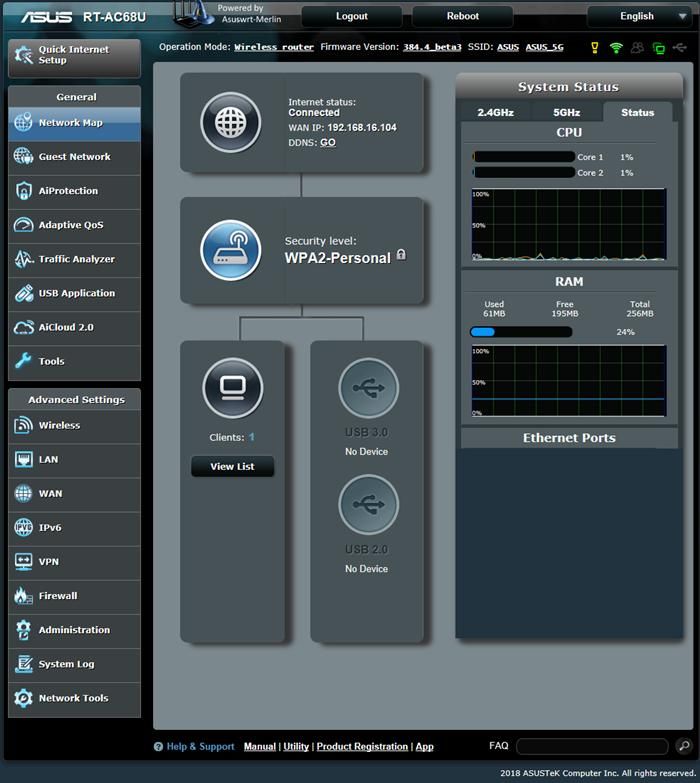
it has a lot of features that i wouldn't expect in a home consumer router (mentioning only those that surprised me. it already has the most basic ones that you'd expect any router to have):
- managing qos bandwidth
- live traffic monitoring with graph
- ftp sharing via usb plugged in the two ports it provides
- option to configure 2.4ghz + 5ghz dual ssids (though of no use for me. more on that below)
- frigging radius client config settings (why on earth, but yes)
- good firewall features with keyword filter as well as url based
- system log with ability to download the logs
flashing openwrt
i flashed it with openwrt the day i got it. how i got it is a different story in itself. now the problem with openwrt is that rt-ac68u has broadcom wifi drivers and they don't opensource them[1], so no wifi support. though that is not an issue, cause i had a tp link router lying around that i now use as dumb AP. with openwrt too this is a beast and one hell of a firewall. i get 102mb of overlay space and trust me, that is not less than heaven for a router. there's so much that i do and have done on it. one of the first things i did after flashing was installing tailscale. make a new zone for it and allow everything on it (hoping one day i will even use it as a exit node as well). i run a custom dns config with smartdns and adblock-fast. my primary ISP router also forwards dns queries to this network. now this weekend, i had the idea to tweak firmware a little. make it a little rolling-release instead of getting stable release, add a little more security hardening than is already there. this router's board is bcm53xx/generic. now i had two options. either i could setup an entire build machine or download a image builder. considering it was the weekend i decided to go for the image builder path considering i wouldn't have to dedicate an hour or two in building the initial firmware image only. i downloaded the image builder and found the target.
make info | grep -i -A 10 'RT-AC68U'
lost my configuration
now i built it and then got the .trx file. i was shocked to see this. i am usually familiar with the sysupgrade images and was expecting that, but it turns out the broadcom drivers expect this. i took a obligatory backup of my router and then moved it to my homelab that is under the asus network and not the isp network and flashed the new image. well, i used the command sysupgrade -T to test the image and later sysupgrade -v to flash it. now what sysupgrade does is, it retains config on upgrade via sysupgrade, but for me, this time it didn't. it completely removed all config. now i had to again give my laptop a static ip, configure the network and restore from the backup and figure out why this happened. now the problem with this was that i had no idea. i had to first figure out and learn about how sysupgrade works.
while digging through this, i found out that i wasn't the first one to hit this (kinda sad well to see this). there was already a fix upstream for bcm53xx nand devices losing config during sysupgrade. the problem was just that the fix hadn't made it into the latest image i was using yet.
the fix[2] itself was hilariously small.
- local root_type=$(identify $dir/root)
+ local root_type=$(identify "$dir/root" "cat")
identify had changed earlier to expect the extraction command as another argument. the bcm53xx upgrade code was still calling it the old way. because of that, it failed to identify the extracted root filesystem as ubi and fell back to writing the whole trx image directly to the firmware partition.
and that fallback was the important part. the normal nand upgrade path knows how to carry /tmp/sysupgrade.tgz into the new ubi/rootfs_data setup. the fallback path didn't. so the router booted perfectly fine after the upgrade, except it came up like i had passed -n to sysupgrade and nuked the config myself.
what should have happened
the path should have been pretty simple. sysupgrade first creates /tmp/sysupgrade.tgz containing the configuration files that need to be preserved. it then switches into the ram-based upgrade environment and starts flashing the new firmware. since this router uses nand with ubi[3], the upgrade process is also responsible for carrying that backup into the new writable filesystem before the router reboots. once the new firmware comes up, the old configuration should already be there on the new overlay and the router should come back almost exactly the way it was before the upgrade.
since this router uses nand with a ubi image, the upgrade process is also responsible for carrying that backup into the new writable filesystem before the router reboots.
what actually happened
the actual path started the same way. sysupgrade created /tmp/sysupgrade.tgz and switched into the ram-based upgrade environment. the bcm53xx upgrade code then extracted the kernel and root filesystem from the trx image. after that, it called identify to check whether the extracted root filesystem was a ubi image.
this is where things went wrong. because the extraction command was not passed to identify, it couldn't read the file and returned an empty result. the upgrade code took that to mean that the image was not using ubi and returned to the generic upgrade path. that path then wrote the complete trx image directly to the firmware partition.
the generic path did still pass the configuration backup to mtd, which works for the non-ubi images that this fallback is actually meant for. but mine was a ubi image that had been identified incorrectly. mtd could write the trx image, but it couldn't put /tmp/sysupgrade.tgz inside the new rootfs_data ubi volume. the router therefore booted the new firmware with the default configuration while my backup was left behind in the old upgrade environment and disappeared when the router rebooted.
another problem hiding in the same upgrade path
while trying to understand why the configuration disappeared, i kept reading through the rest of the bcm53xx upgrade code and found another problem in the same fallback path. the nand-aware helpers used return not only when an image was intentionally supposed to use the old whole-image upgrade path, but also when something had actually failed.
this meant that failures such as not being able to extract the trx partitions, the new kernel being too large for its partition, failing to prepare the kernel trx or failing to prepare the ubi image didn't necessarily stop the upgrade. the helper returned to its caller, and the caller continued by writing the complete image directly to nand anyway. in the kernel size case, this practically meant that the code could tell you that the kernel didn't fit and then continue flashing the image through a path that bypassed the same check.
the earlier identify fix solved the bug that had removed my configuration, but these other returns were still there. so i opened openwrt/openwrt#24841 to change the genuine preparation errors from return to exit 1. now, if one of those steps fails, the upgrade stops instead of falling through to the whole-image writer.
the patch still keeps the intentional return for actual non-ubi images. those images are supposed to use the older default_do_upgrade() path, where configuration can still be preserved using mtd -j. so the change is not about removing the fallback completely. it is about making sure that only images meant for that fallback can reach it, while real errors stop the upgrade.
let's see if our changes get merged. it was a fun day of debugging and learning how the upgrade process works. i have named my gateway without a doubt with the lack of ideas and a name hiding in plain-sight:

for now we have fixed a few bugs. my image builder now has all the packages i want by default, has all the config of the packages i use by default. has the patch we wanted and we made, so future sysupgrades are smooth. there's more i want to do. maybe changing privilege daemon's have or i don't know. keeping it out for a while. the above was one hell of a experience.
broadcom's driver used by the stock firmware is proprietary. linux has the open source
b43driver, which was largely developed by reverse engineering broadcom hardware, but its support for the bcm4360 ac phy used by the rt-ac68u is marked as broken and is not enabled by openwrt. because of that, neither of the router's built-in wifi radios is usable with openwrt. proper support could still be developed if broadcom ever released the required hardware documentation, programming guides or an open source driver. ↩︎identifyis a shell function from openwrt's nand upgrade library. it reads the first few bytes of an image and compares their magic number to known formats such as ubi, ubifs, fit and gzip. its first argument is the image to inspect and its second argument tells it how to read that image. for a normal uncompressed file, that command iscat. without the second argument, the function couldn't read the extracted root filesystem and returned an empty result instead ofubi. ↩︎ubi stands for unsorted block images. it is a layer designed for raw nand flash that handles things such as bad blocks, wear levelling and dividing the flash into volumes. on this router, those volumes hold the read-only root filesystem and the writable
rootfs_dataused for configuration and other changes. ubi itself is not a filesystem. filesystems such as ubifs can be placed inside its volumes. ↩︎