powering a home machine remotely and how wake on lan actually works
should i sleep right now? probably yes, but not before i finish writing this post.
do you ever wish that when you are not at home, you could just turn on your home computer remotely? well, i do too. we have that in common if you do. i'd rather want a home server, but i am not able to convince myself to spend money on one right now (though i think, i might not be able to resist for long. grown men do need toys after all).
anyone who has read my last post knows i was tinkering with getting remote access to my home computer but not open to using wireguard. i wanted something simpler, though we all know that's just an excuse because i don't have energy past 9 pm these days to set it up.
a big f you autossh, hello tailscale
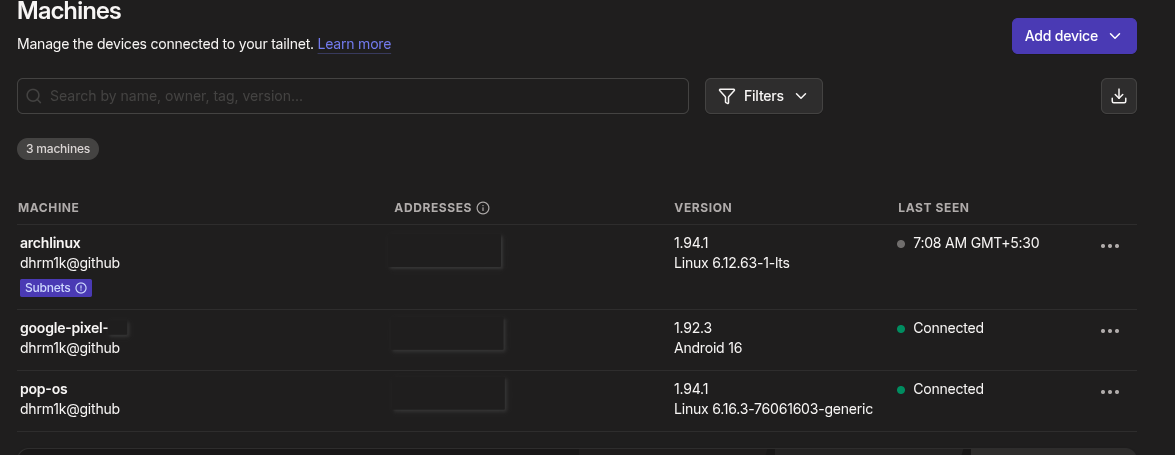
yesterday night i was so frustrated on autossh fails. decided to finally give tailscale a try to set up a vpn so i can access my home network even when i am not home. tailscale is a zero-config vpn that uses wireguard under the hood. it is super easy to set up and works like a charm. i have never used it prior to this but read a lot about it and i gotta say it's so sick. i have installed it on all my devices, my laptop, my home computer, even my phone. i still have to try the neuralink made tui for tailscale, that i keep reading and telling everyone about, but later.
now i have wake on lan enabled on my home computer and all my devices are now added to tailscale. the only problem was power management. there must be times when i want to remotely shutdown my computer. i don't know when, but there must come a time right? like what if i accidentally leave some heavy process running and want to shut it down to save power? or what if i just want to feel the power of turning off a machine hundreds of kilometers away? the universe works in mysterious ways.
a little gibberish on what is wake-on-lan?
wol is a networking standard that allows a computer to be turned on or awakened by a network message. the way it works is actually pretty neat - when you want to wake up a computer, you send what's called a "magic packet" over the network. this packet is just a specific sequence of bytes: six bytes of all 255s (0xFF in hex), followed by sixteen repetitions of the target computer's MAC address. that's it. no encryption, no fancy protocol, just a very specific pattern of bytes broadcast over the network.
the interesting part is how a computer that's "off" can even receive this packet. when you properly shut down a computer (like using systemctl poweroff on linux), it doesn't actually cut all power. modern power supplies have what's called a 5VSB (5 volt standby) line that stays on even when the computer is off. this standby power keeps a tiny part of the network card alive and listening for that magic packet. when the network card sees the right pattern with its MAC address, it sends a signal to the motherboard to trigger the power supply and boot up the computer. it's like leaving a very specific doorbell running that can wake up the entire house.
one of the thing that got me curious was that how does the computer listen to the wol packet when it's off? i specifically use the command systemctl poweroff to turn it off. turns out that even when the computer is off, this specific command takes it to soft off (what's technically called ACPI state S5), and the 5VSB line of the power supply is still on, which powers the network card to listen for the wol packet. the network card basically sits there in an extremely low power state, just waiting for that one specific pattern of bytes. when it sees it, boom, it tells the motherboard "hey, someone's calling for us" and the whole computer springs to life. cool right?
priorly to this, i have a l2 wireless switch on my network that too gets an ip address from my router. this switch is nothing but a spare lying tp-link router. i flashed openwrt on it (already in the last post) and set it up as a dumb access point. this way, all devices connected to this access point are on the same subnet as my main router.
i already had the autossh part figured out in the last part, but still the problem was that whenever my computer was off, i could not reach it to send the wol packet. also another problem was that now that i want to setup kasm at places without worrying about logging into services at random computers and later worry that i logged in, and then cause a chaos spree to change passwords everywhere.
i had to set up wol from bios first and to my surprise it was already on. maybe, some other day, i might have had the urge to turn it on but quit setting it up because i was lazy. it's funny how easily i am forgetting things lately. i had a vm fully configured on my device, though i have no memory or account of when i did that. i was just grateful "oh, mother frigging god, it exists" state.
to first test things out, i tried sending the wol packet from my local network from my pop os machine to my arch machine. our beloved package manager has a package called wakeonlan that makes it super easy to send the packets from the terminal:
sudo apt install wakeonlan
wakeonlan <mac-address-of-arch-machine>
it worked like a charm. the arch machine woke up in no time. enabled wake on lan and it mother frigging works in the first try.
as usual, storage problems
now the next step was to send the wol packet from my openwrt router. to which i assumed "hey lord, opkg must have a package" and it very much did, the package size was just in 5-6 kb range, and it was also titled wakeonlan, so i assumed installing it would be a breeze, until wait, i clicked on install and it showed that one of the dependencies was perl that too alone is 3mb. well, i hope i have ranted enough already how my router's flash memory is 2mb. so i had to find an alternative way.
after some googling and gpting, i figured out i could install socat package and use it to send the wol packet. socat is a command line based utility that establishes two bidirectional byte streams and transfers data between them. the package was small enough to fit on my router and it could construct and send the magic packet using UDP broadcast.
here's the script i ended up with:
root@OpenWrt:~# cat socat-wol.sh
MAC="your-mac-address-without-colons"
printf '\xff\xff\xff\xff\xff\xff\x18\xc0\x4d\x3d\xc8\xc6\x18\xc0\x4d\x3d\xc8\xc6\x18\xc0\x4d\x3d\xc8\xc6\x18\xc0\x4d\x3d\xc8\xc6\x18\xc0\x4d\x3d\xc8\xc6\x18\xc0\x4d\x3d\xc8\xc6\x18\xc0\x4d\x3d\xc8\xc6\x18\xc0\x4d\x3d\xc8\xc6\x18\xc0\x4d\x3d\xc8\xc6\x18\xc0\x4d\x3d\xc8\xc6\x18\xc0\x4d\x3d\xc8\xc6\x18\xc0\x4d\x3d\xc8\xc6\x18\xc0\x4d\x3d\xc8\xc6\x18\xc0\x4d\x3d\xc8\xc6\x18\xc0\x4d\x3d\xc8\xc6\x18\xc0\x4d\x3d\xc8\xc6' | socat - UDP-DATAGRAM:255.255.255.255:9,broadcast
you can see the magic packet structure right there in the printf - six \xff bytes followed by my MAC address repeated sixteen times. that's exactly what the network card is waiting for. i tested this script and well, it did turn on my computer.
the final thing
now i can autossh into my router from the tunnel i have via my vps anytime, wake my computer on lan via the magic packet, and after waiting hopefully for 30 seconds (sometimes it feels like an eternity when you're staring at the terminal waiting for the ssh connection to establish, wondering if the packet even reached or if your computer decided to be moody and never wake up), i can then ssh into the computer via tailscale and use it even as a vpn to access my home network.
the whole chain looks like this: ssh into vps, then reverse ssh into home router, then run the wol script to wake the computer, wait a bit while questioning all life decisions that led to this moment, and finally ssh into the computer via tailscale. smooth and sweet as a pie.
i can also power it off remotely because systemctl poweroff doesn't actually kill all power, the NIC stays powered by that 5VSB line, still listening for the magic packet like a faithful guard dog. when the packet arrives, the motherboard asserts the power-on signal and boom, the whole computer springs to life.
it's been a good day.
now i should probably sleep.